

- Real double-entry books
- GST, HST, QST and PST built in
- Your accountant gets their own login
- In English · Français (Canada) · Español · 中文(简体) · فارسی · العربية
How it works
From shoebox to filed, without the year-end rescue.
You approve. NumKeep posts. Your accountant files.
Receipt
Bytown Office Supply
Ottawa, ON · 2026-10-06
- Subtotal
- $84.00
- HST 13%
- $10.92
- Total
- $94.92
Paid with Visa ••4417
Journal entry
| Account | Debit | Credit |
|---|---|---|
| 8810Office Expenses | $84.00 | |
| 2310GST/HST Payable | $10.92 | |
| Business Visa ••4417 | $94.92 |
Balanced. Waiting for your OK.
- 01
Capture
Snap one receipt or a whole stack. NumKeep reads the vendor, date, taxes and the card you paid with, flags duplicates, and waits for your OK. Works offline on your phone.
- 02
Books
Every approved receipt, invoice and bill posts a balanced journal entry. Quotes turn into invoices, in full or in parts.
- 03
Your accountant
Bring them in on any paid plan. They see the same books, ask about any line, and you answer with a photo or a voice note, right on that line.
- 04
Filing
Sales-tax returns from posted entries, more than 50 reports with PDF export, and a CRA-ready document pack by year when you are asked for proof.
AI Notice: NumKeep uses Artificial Intelligence to extract data from your documents. While highly accurate, AI can occasionally make mistakes. Please verify all extracted information for accuracy before saving.
What's inside
Everything between the receipt and the return.
Real double-entry books, without needing to know what a debit is.
Scan a whole stack
Upload a pile of receipts at once. They line up in a review queue, duplicates are flagged, and the card you paid with is matched to the right account. Approve them one by one, or all at once.
Quotes that become invoices
Email a quote, then bill it in full or in parts as the work gets done. Record a payment and the books update.
Sales tax from your own entries
GST, HST, QST and PST at your province's rates. Returns are built from what you actually posted, not from a spreadsheet.
More than 50 reports
Profit and loss, balance sheet, sales tax and more. Export to PDF or CSV, or email them straight to your accountant.
Questions on the line
Your accountant asks about any entry, right where it sits. Reply with a photo or a voice note.
Proof on demand
Records grouped by year and tied to the filing they support. If the CRA asks, export the year as one tidy package.
Accounts you already know
A chart of accounts laid out the way QuickBooks users expect, with CRA line codes behind every category.
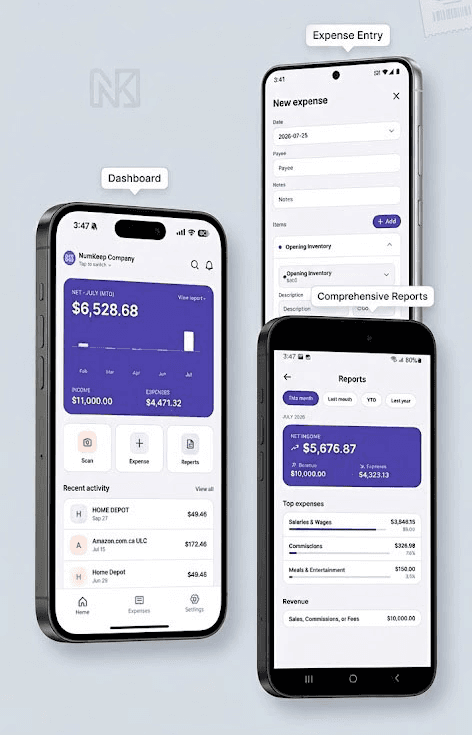
iOS and Android
Your books,
in your pocket.
Scan receipts, track spending, and check your numbers from anywhere. The NumKeep app keeps your business one tap away.
Snap a receipt in seconds
Point your camera and let the AI do the rest. No typing, no shoeboxes.
Scan a stack at once
Pick a stack of receipts from your camera roll. They upload in the background while you keep working.
No signal? Keep scanning.
Receipts and trips save on your phone first and upload when you are back online.


Built for
- Sole proprietors
- Incorporated businesses
- Quebec businesses (QST)
- The accountants who serve them
Questions people ask first
Is the free plan really free?
Yes. One company, 15 receipts and 3 invoices a month, no card and no end date. Upgrade only when you need more.
Can my accountant get in?
Yes, on any paid plan. Invite them from Settings and they get their own login to your books.
Do you handle QST and PST?
Yes. GST, HST, QST and PST are built in, and the rate follows your province.
What happens to my data if I leave?
Export your reports to PDF or CSV any time. Your records stay yours.
Is my data safe?
Receipts and documents are encrypted at rest with AES-256, everything is encrypted in transit, backups are encrypted, and we never sell your information.